
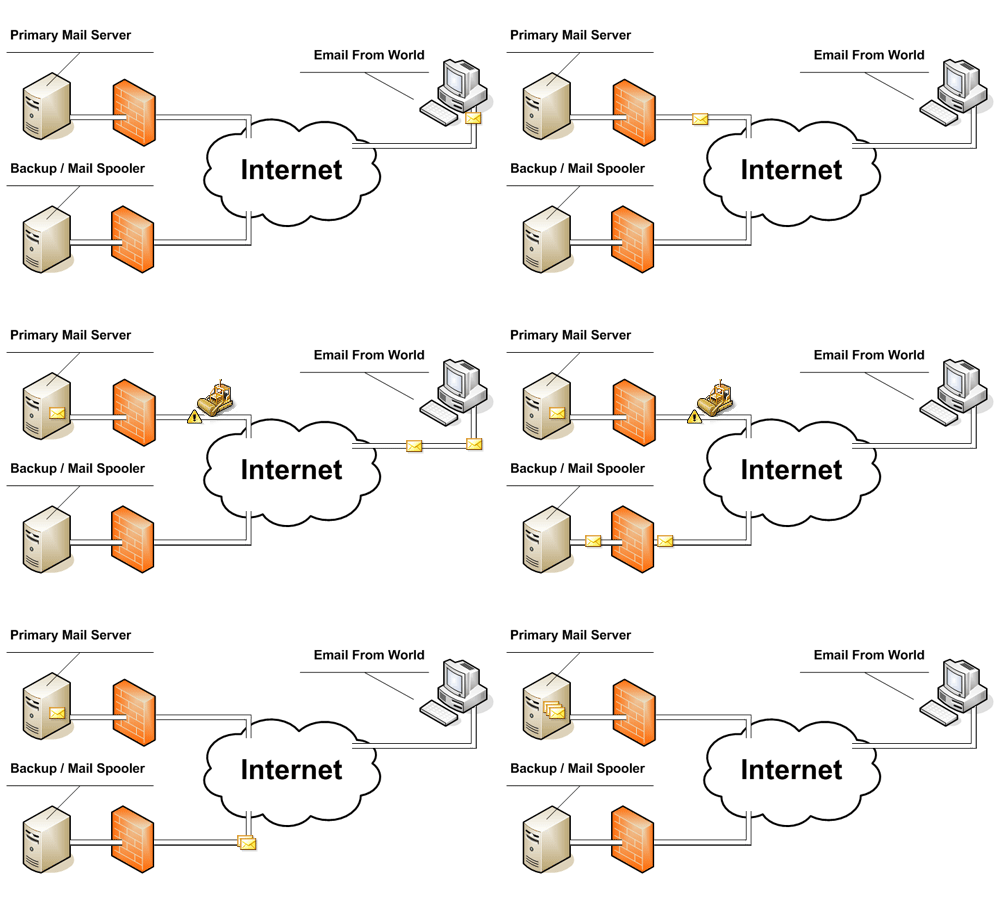
The Secondary MX plugin allows you to turn a Full or DNS Only cPanel/WHM server into a backup mail spooler. This adds additional redundancy by providing a second location for incomming mail to be spooled (stored) in the event any of your primary servers are unreachable. Once the primary server becomes accessible all mail from the spooler is then delivered.
Install our plugin on your own hardware at your own location. We simply provide you with the software you need!
$5.00/MonthOur hosted solution includes a small virtual server preconfigured with DNS-ONly cPanel/WHM and our SMX plugin!
Starting at $10/MonthThe first step in the process of delivering mail is for the sending mail server to lookup what's called an MX record. This record provides the sending server with a list of servers that it should try to deliver mail to. These records also contain a priority or weight that tells the sending server in what order it should try delivery. The sending server then attempts to connect into each remote server and deliver the message, if the sending server cannot make a connection it will simply try the next server in it's list. The SMX server will be one of these servers in the list and when mail is delivered to it, the SMX will immediately try to deliver the message to the lowest MX server. If that delivery fails the SMX stores the email in it's spool and waits a set amount of time were it will attempt delivery again.
Did you know that for every cPanel/WHM license you purchase with us we will also give you a FREE secondary MX license that you can use on any server! Transfer your existing cPanel/WHM licenses today and we will even match your current providers license price and renewal date. The tranfer process is simple, there is no downtime, and you will have no billing overlap!. If you are interested in finding out more information please our license transfers page.
